3 languagesGreek, Greeklish, EnglishIn the same search box, no switching
✦ Pandora AI · 6 AI employees · Free AI Profit Scan in 60 sec

PANDORASEARCH · AI PRODUCT SEARCH
PandoraSearch: the search bar that understands your shoppers.
✦The best AI search straight in your chatbot
Shoppers type the way they speak: Greek, Greeklish or English, a model number or a description. PandoraSearch finds the right products, shows AI picks and filters as they type, and lets them search by photo with Pandora Lens. It sits on top of your existing search box, so nothing in your theme changes.
- ✓ Greek, Greeklish & English
- ✓ Included in SalesBot Growing eShop
- ✓ No overage charges
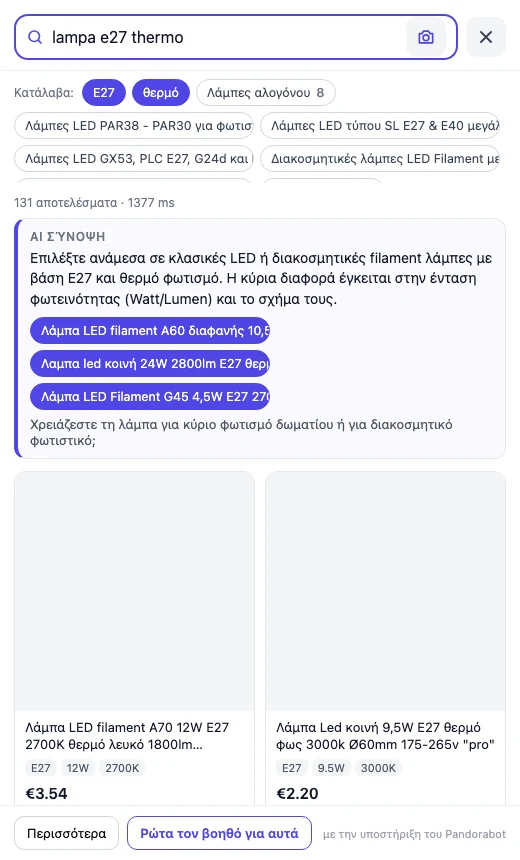 DESKTOP
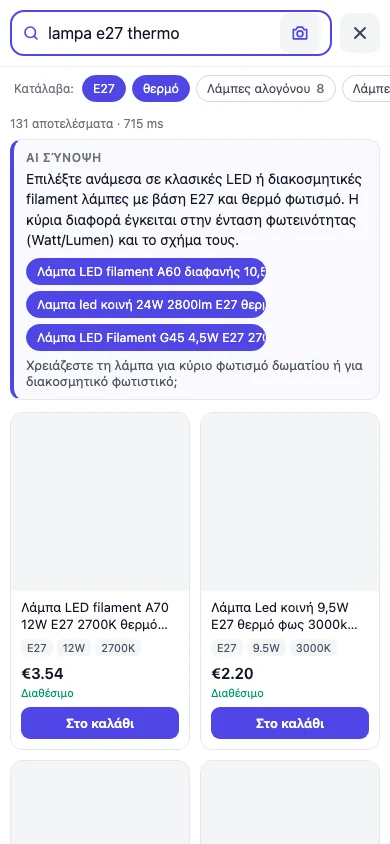 MOBILE
5–30 msserver-side resultsMeasured on a 39,590-product Greek catalogue
€0overage, everSoft limits: search keeps working in basic mode
€29entry plan, 20,000 searchesIncluded from SalesBot Growing eShop
WHAT SHOPPERS SEE
From the first letter to the right product, in one panel.
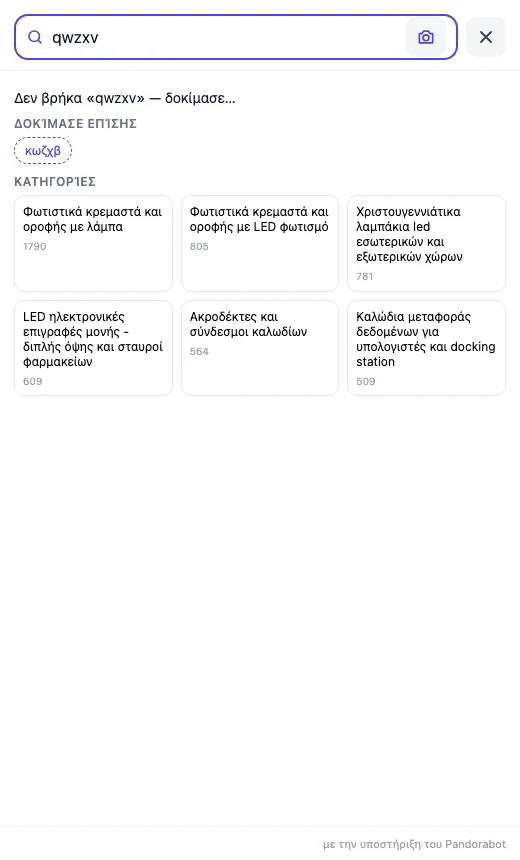
The shopper clicks your search box and PandoraSearch opens a drawer over the page. Results appear as they type, the specifications they mention become chips, and a short AI overview points to the closest matches from your own catalogue.
HOW IT WORKS
Installs on the search box you already have.
No theme rebuild and no new page. PandoraSearch attaches to your existing search field and opens its own drawer over your store.
Connect your catalogue
Your product feed or a CSV export: names, descriptions, specifications, prices, stock and images. We index it in Greek, Greeklish and English.
Add one snippet
A single script tag on your store. It finds your search box, keeps your theme as it is and opens the drawer when the shopper starts typing.
Watch what people search for
Top queries, zero-result queries and the products shoppers click most, in your dashboard. Fix gaps in the catalogue, not in the search engine.
WHAT IT DOES
Eight things a search bar should have done years ago.
Every package includes keystroke search, typo tolerance, facets, spec chips, alternatives when nothing matches and search analytics. AI overviews and Pandora Lens are metered per package.
Understands meaning, not only keywords
“Warm bulb for the living room” finds the right lamps, even when none of those words is in the product title.
Greek, Greeklish and English in one box
Shoppers switch alphabets mid-word. PandoraSearch reads all three and forgives typos on longer words.
A short, grounded answer with up to 3 products
An AI overview written from your own catalogue, with the closest matches linked. Never invented products.
Filters that appear as shoppers type
Size, base, colour and category chips show up from the first letters, so narrowing down takes one tap.
Search by photo
The shopper uploads a picture and Pandora Lens returns the closest products from your catalogue.
Hands over to SalesBot with the search as context
One button sends the shopper to the SalesBot assistant with the query and the results already loaded.
Your search analytics
Top queries, zero-result queries and top clicked products, so you see what shoppers want and cannot find.
Monthly limits, never a surprise bill
Over a limit, search falls back to basic mode and we tell you at 80% and 100%. No overage charges.

PANDORA LENS
When the shopper has a photo instead of a name.
A picture from a friend, a screenshot from social media, the broken part in their hand. Pandora Lens takes the photo and returns the closest products from your catalogue, with price and stock, inside the same drawer.
- ✓Camera button inside your search field, on desktop and mobile
- ✓Matches against your own product images, not the open web
- ✓Included in Plus and Scale, and in SalesBot Power eShop
500 to 3,000 photo searches a monthPlus and Scale packages; only successful searches count
PLANS & PRICING
Pay for the searches that happen, not the keystrokes.
Every package includes the drawer, three languages, filters, spec chips, alternatives for zero results and search analytics. Limits are per calendar month and reset on the 1st.
For a small to mid-size catalogue that wants a better search bar.
€29/month
- ✓ 20,000 searches a month
- ✓ 2,000 AI overviews a month
- — No Pandora Lens photo search
- ✓ Up to 25,000 products indexed
- ✓ Greek, Greeklish and English
- ✓ Filters, spec chips, analytics
For a growing shop with steady traffic that wants photo search.
€69/month
- ✓ 75,000 searches a month
- ✓ 8,000 AI overviews a month
- ✓ Pandora Lens: 500 photo searches a month
- ✓ Up to 50,000 products indexed
- ✓ Greek, Greeklish and English
- ✓ Filters, spec chips, analytics
For large catalogues and high traffic.
€149/month
- ✓ 150,000 searches a month
- ✓ 15,000 AI overviews a month
- ✓ Pandora Lens: 3,000 photo searches a month
- ✓ Up to 150,000 products indexed
- ✓ Greek, Greeklish and English
- ✓ Filters, spec chips, analytics
For very large catalogues, agencies and chains that need their own limits.
Quote
- ✓ Searches, overviews and photos per contract
- ✓ Above 150,000 products
- ✓ Pandora Lens photo search
- ✓ Chat handoff on request with SalesBot
- ✓ Greek, Greeklish and English
- ✓ Same soft-limit behaviour, no surprise bills
WITH SALESBOT
Already on SalesBot? PandoraSearch is included.
SalesBot Growing eShop and Power eShop include PandoraSearch at no extra cost, with the handoff from search to the SalesBot assistant switched on.
| SalesBot plan | PandoraSearch | Searches | AI overviews | Lens photos | Products | Chat handoff |
|---|---|---|---|---|---|---|
| Growing eShop €99/month | Core included | 20,000 | 2,000 | — | 25,000 | Yes |
| Growing eShop + PandoraSearch Plus add-on (+€39) | Plus | 75,000 | 8,000 | 500 | 50,000 | Yes |
| Power eShop €149/month | Scale included | 150,000 | 15,000 | 3,000 | 150,000 | Yes |
iPlans include monthly fair-use limits on searches, AI overviews and Lens photo searches. We never bill overage: if you reach a limit, search keeps working in basic mode and we tell you before and when it happens. All prices in EUR, excluding VAT.
iSalesBot Small Business and below keep the basic AI search in chat and do not include the PandoraSearch drawer. Standalone packages do not include the chat handoff, which needs SalesBot chat.
✓ Monthly, cancel anytime✓ Limits reset on the 1st✓ No overage charges✓ EUR, excl. VAT
WHAT COUNTS AS A SEARCH
A settled search, in plain words.
A settled search is a search the shopper finishes: they stop typing for a moment, or press Enter. The results shown while they are still typing do not count. Typing “lampa e27” is nine keystrokes and one search.
COUNTS
- ✓The shopper pauses typing or presses Enter and sees the first page of results
- ✓The same shopper searching the same words again after a minute
- ✓One AI overview shown, new or replayed from the 24-hour cache
- ✓One Pandora Lens photo search that returns results
DOES NOT COUNT
- —Results that update on each keystroke
- —The same shopper repeating the same words within a minute
- —Pressing Load more, switching a filter chip, clicking a product
- —Photo uploads that fail or are rejected
30-MINUTE LIVE DEMO
See PandoraSearch on your own catalogue.
No slide deck. We load your products and type the queries your customers actually use: Greek, Greeklish, model numbers, half-remembered names.
- ✓ Your catalogue, your real queries
- ✓ Zero-result rate before and after
- ✓ AI overview and Pandora Lens on your products
- ✓ Handoff to SalesBot if you use it
FAQ
The questions worth asking first.
01What counts as a search?
A settled search: the shopper pauses typing for a moment or presses Enter and sees the first page of results. Results that update on each keystroke are free and never counted, and the same shopper repeating the same words within a minute counts once. Typing “lampa e27” is nine keystrokes and one search. An AI overview counts when it is shown, and a Pandora Lens photo search counts only when it returns results.
02What happens when I reach a limit?
Search keeps working. Over the monthly search limit, results stay fast but without the AI meaning match. Over the AI overview limit the overview card is hidden; over the photo limit the camera button is hidden. Each limit is checked separately, you get an email and a dashboard notice at 80% and 100%, and there are no overage charges at any package. Limits reset on the 1st of each month.
03Does it work with Shopify, WooCommerce and Zendesk?
PandoraSearch installs on Shopify and WooCommerce stores and syncs your products, prices and stock from the live catalogue, the same way SalesBot does. It sits on top of your existing search box, so your theme does not change. Zendesk is a SalesBot support feature and is not part of PandoraSearch.
04Do I need SalesBot to use PandoraSearch?
No. Core, Plus and Scale work on their own. If you already use SalesBot, Growing eShop includes PandoraSearch Core and Power eShop includes PandoraSearch Scale at no extra cost, and the drawer can hand the shopper over to the SalesBot assistant with the search as context. That handoff is the one part that needs SalesBot chat.
05How is my catalogue indexed?
From your product feed or a CSV export: names, descriptions, specifications, prices, stock and images. Each package indexes up to a set number of products. If your catalogue is larger, the most popular in-stock products stay searchable and nothing is deleted; the dashboard tells you the catalogue is above the package. Pandora Lens needs product images, so the camera may stay hidden until image indexing is complete.
06Can I try it before I commit?
Book a demo and we run PandoraSearch against your own catalogue and your real customer queries. Contact us about a pilot if you want to measure it on your store before choosing a package. Plans are monthly, in EUR excluding VAT, and you can cancel any time.
YOUR NEXT MOVE
Book a demo Give your shoppers a search bar that understands them.
From €29 a month, included in SalesBot Growing eShop, and never a surprise bill. Book a demo and see it on your own catalogue.